
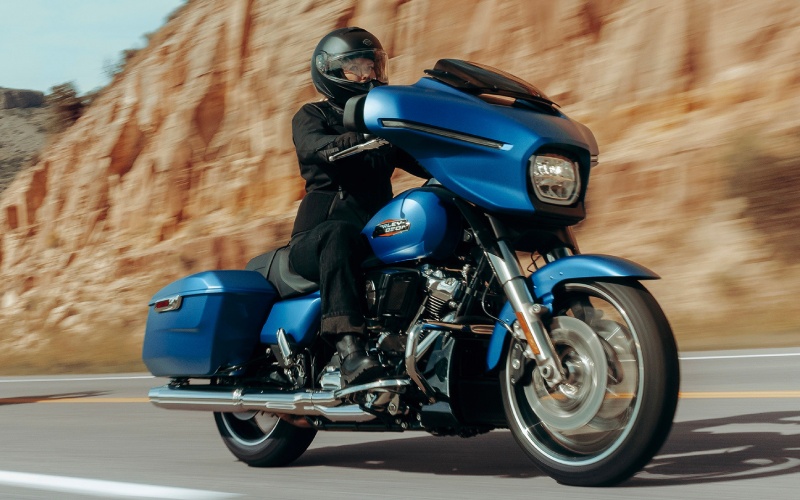
Electric City Harley-Davidson® - Why Riders Around Mountain Top, PA, Are Zeroing In on the 2026 Harley-Davidson® Street Glide®
When you focus on what truly shapes every mile—clarity at the controls and confidence under pressure—the 2026 Harley-Davidson® Street Glide® stands out for two decisive advantages: its Skyline™ OS infotainment platform and the comprehensive Rider Safety Enhancements. For riders charting weekend loops or stitching together multi-day routes, these systems turn a great ride into a consistently better one. Skyline™ OS centers a 12.3-inch full-color TFT screen that remains legible in sun glare and responsive with gloves. Navigation cues are easy to read, Apple CarPlay syncs your go-to apps, and Bluetooth support keeps calls and audio organized without stealing attention. Pair that with thoughtful audio—two 5.25-inch speakers powered by 50 watts per channel—and you have a cockpit that calms the ride and clarifies the road ahead.
Confidence comes from control, and the Rider Safety Enhancements deepen that control without getting in your way. The suite works behind the scenes during acceleration, braking, and deceleration, with Cornering Rider Safety Enhancements that tune responses as lean angle changes. Anti-lock Brake System, Electronic Linked Braking, Traction Control System, Drag-Torque Slip Control, Vehicle Hold Control, and Tire Pressure Monitoring deliver support when pavement turns patchy, weather shifts, or traffic compresses. Cornering-enhanced variants—C-ABS, C-ELB, C-TCS, and C-DSCS—further refine input at the edge of traction. The result is a touring motorcycle that preserves the visceral feel of the ride while intelligently helping you maintain it, mile after mile.
- Skyline™ OS advantages: A 12.3-inch TFT, Apple CarPlay integration, and Bluetooth deliver navigation, media, and bike data with minimal distraction.
- Audio clarity at speed: Two 5.25-inch fairing speakers and 50 watts per channel keep podcasts, playlists, and calls intelligible on the highway.
- Safety that scales: Cornering Rider Safety Enhancements adapt braking and traction support as lean angle changes, building confidence in variable conditions.
Real-world scenarios underscore these strengths. Consider a late-afternoon run where glare can wash out smaller displays—Skyline™ OS stays legible and keeps your next turn prominent. Or think about cresting a damp bridge deck after a dry stretch—cornering-aware ABS and traction management help the bike stay composed while you ride your line. These aren’t theoretical benefits; they’re the difference between tensing up and staying smooth.
For riders building their first Grand American Touring setup, start with cockpit fit and dashboard priorities. Angle the display to minimize reflections, configure your home screen with primary navigation tiles, and set Bluetooth priorities so your headset reads you, not the road noise. Next, get to know your Rider Safety Enhancements. Understand how Vehicle Hold Control engages on hills, what TPMS thresholds prompt attention, and how cornering systems subtly adjust responses when the bike is leaned. Once familiar, these tools fade into the background—exactly where they belong.
Electric City Harley-Davidson® — serving Mountain Top, Carbondale, and Pittston — helps riders personalize the 2026 Harley-Davidson® Street Glide® setup to match local roads and longer routes. Whether you value turn-by-turn clarity, audio presence, or a broad safety net, dialing in controls to your habits pays dividends on every ride.
Frequently Asked Questions:
Does Apple CarPlay require a wired connection?
No. Apple CarPlay on the Street Glide® works wirelessly or via a wired USB-C connection, so you can choose what suits your routine.
Are the Rider Safety Enhancements always active?
Yes. The systems continuously monitor inputs and conditions, with cornering-enhanced features adjusting support based on lean angle. They assist the rider but never replace rider judgment.
Can the audio system keep up at highway speeds?
Yes. With two 5.25-inch fairing speakers and 50 watts per channel, the system remains clear and intelligible even when wind and road noise rise.
What should I set up first on Skyline™ OS?
Start with Bluetooth pairing for your phone and headset, configure navigation preferences, and arrange key data tiles—fuel range, tire pressure, and route guidance—so vital info is one glance away.